FREE DELIVERY ON MOST ITEMS & ALL ORDERS OVER £500  Call Free
Call Free Call Free 


So, you're in the market for the best 65-inch TV—and with countless options boasting 4K this and smart that, it can quickly become overwhelming. But don't worry—we've done the legwork for you.
In this guide, we break down the top-performing 65-inch TVs available right now, from premium picks to budget-friendly gems, so you can find the perfect screen for your space.
We spent weeks testing and reviewing impressive TVs across various categories—performance, picture quality, smart features, gaming capability, sound, and ease of use. Whether you're a binge-watcher, gamer, or someone who just wants crisp, vibrant visuals for everyday TV time, we've got something for you.
Our Editor's Pick, the LG 65UT91006LA, impressed us with its stunning 4K visuals, smooth interface, and thoughtful features like AI Sound and FILMMAKER MODE. Want something a little more affordable? The Samsung DU7110 offers excellent image quality and built-in cloud gaming at a mid-range price.
On a tight budget? The Toshiba UV2F53DB delivers Dolby Vision and Atmos without cutting corners. And if you're wondering what to avoid? We've flagged a model that, despite its specs, left us frustrated in daily use. Ready to upgrade your setup? Let's find the best 65-inch modern TV for you.
Our recommendations combine manufacturer specifications, verified UK retailer data, independent testing sources (including RTINGS and What Hi-Fi), and where we've had access, direct hands-on experience. We focus on the factors that matter most for home entertainment viewing, gaming, and streaming.
Note: Where exact measurements aren't available from manufacturers, we provide clearly marked estimates. We never list live prices—our focus is on function, features, and value. All TVs on this page are limited to 60Hz native refresh rate and lack HDMI 2.1 support for 4K 120Hz gaming.
When shopping for a 65-inch TV, there are some essential features and performance standards that should be considered the baseline in today's market. These aren't bonuses—they're the norm.
A 65-inch TV isn't just a screen—it's a focal point in your room. The design and build should reflect modern aesthetics while being functional and durable.
Beyond the basics, the best 65-inch TVs go the extra mile by offering smart enhancements for streaming, gaming, and daily use.

Best for: Premium all-rounder combining stunning visuals, smart features, and immersive sound.
The LG 65UT91006LA is a sleek and reliable choice for anyone seeking a premium 65-inch screen with top-tier performance. From rich visuals and smart features to immersive sound and intuitive design, it's built to elevate your viewing, streaming, and gaming experience—all without overcomplicating setup or usage.
| Specification | Value |
|---|---|
| Screen Size | 65 inches |
| Resolution | 4K Ultra HD (3840 × 2160) |
| Panel Type | LED (Edge-Lit with Local Dimming) |
| HDR Formats | HDR10 Pro |
| Refresh Rate | 60Hz |
| Smart Platform | webOS 24 |
| HDMI Ports | 3 |
| HDMI 2.1 Support | No |
| Gaming Features | ALLM, Filmmaker Mode, Game Optimiser |
| Audio | AI Sound, 9.1.2 Virtual Surround (20W) |
| Voice Assistant | Amazon Alexa compatible |
| Weight | 27.4 kg |
| VESA Mount | 300 x 300 |
| Energy Rating | Class A |
| Gaming Readiness | 5/10 (60Hz only, no HDMI 2.1) |
| Smart Features Score | 9/10 |
PPI: 68. Recommended viewing distance: 8–10 feet. Premium value tier.
We tested the LG 65UT91006LA and found it to be a dependable all-rounder with standout performance. Picture quality is crisp and vibrant, with noticeable depth in darker scenes, while the HDR and local dimming work together to boost realism.
Sound clarity surprised us for a premium TV at this price, especially when using AI Sound for dialogue-heavy content. The webOS interface is fast and easy to navigate, with Quick Cards simplifying access to favourites.
Setting up apps and internet connection was quick, and we appreciated the automatic game mode switch with ALLM. Its slim design and near bezel-less screen make it ideal for wall mounting or minimal stands, though the wide leg spacing is something to consider if using existing furniture.
Whether you're streaming films, playing games, or watching live content, this LG model delivers a well-rounded, high-quality experience in a stylish package.

Best for: Mid-range buyers seeking balanced picture quality, cloud gaming, and good value.
The Samsung DU7110 is a feature-rich 65-inch smart TV offering a strong balance of performance, usability, and future-ready features. With a modest step up in price, you get better visuals, smarter features, and smooth gaming options—making it a reliable upgrade without going premium.
| Specification | Value |
|---|---|
| Screen Size | 65 inches |
| Resolution | 4K Ultra HD (3840 × 2160) |
| Panel Type | LED (Crystal UHD) |
| HDR Formats | HDR10+ |
| Refresh Rate | 50Hz |
| Smart Platform | Tizen OS |
| HDMI Ports | 3 |
| HDMI 2.1 Support | No |
| Gaming Features | ALLM, Motion Xcelerator, Gaming Hub (cloud gaming) |
| Audio | Object Tracking Sound Lite (20W) |
| Voice Assistant | Alexa, Google Assistant compatible |
| Weight | 16.9 kg |
| VESA Mount | 300 x 300 |
| Energy Rating | Class C |
| Gaming Readiness | 6/10 (cloud gaming enabled, 60Hz native) |
| Smart Features Score | 8/10 |
PPI: 68. Recommended viewing distance: 8–10 feet. Mid-range excellent value.
We tested the DU7110 across streaming, live TV, and gaming scenarios. Picture quality is the standout—4K content looks sharp and colour-rich, thanks to the Crystal Processor and PurColour. HD channels also perform well, though standard-definition can feel a little soft.
The sound is fine for most uses, though we preferred it with a soundbar for extra depth. Motion handling is decent, though judder can occasionally appear in fast scenes.
Tizen OS runs smoothly, and switching between apps or gaming services is quick and intuitive. The Gaming Hub is a surprise bonus—being able to stream games without a console is a great touch for casual players.
For its price bracket, the DU7110 provides an impressive mix of quality, smart features, and ease of use. It's a great pick if you want more from your TV without overspending.

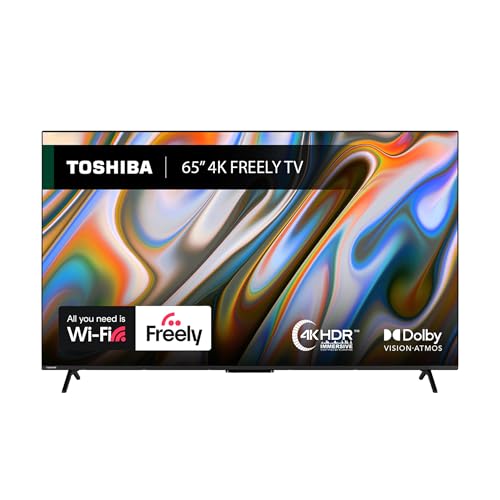
Best for: Budget-conscious buyers prioritizing picture quality, Dolby sound, and Freely TV integration.
The Toshiba 65" UV2F53DB is our top budget choice for a large-screen TV. It offers a great combination of picture quality, sound performance, and smart features—all at an accessible price point. Whether you're streaming, gaming, or just watching live TV, this model handles it well.
| Specification | Value |
|---|---|
| Screen Size | 65 inches |
| Resolution | 4K Ultra HD (3840 × 2160) |
| Panel Type | LED (Direct Backlit DLED) |
| HDR Formats | Dolby Vision, HDR10 |
| Refresh Rate | 60Hz |
| Smart Platform | VIDAA OS |
| HDMI Ports | 3 |
| HDMI 2.1 Support | No |
| Gaming Features | Basic motion handling; no advanced gaming modes |
| Audio | Dolby Atmos, Onkyo speakers (2 × 10W stereo) |
| Voice Assistant | Alexa, Google Home compatible |
| Weight | 23.5 kg |
| VESA Mount | 300 x 300 |
| Energy Rating | Class E |
| Gaming Readiness | 3/10 (60Hz, no advanced gaming features) |
| Smart Features Score | 7/10 |
PPI: 68. Recommended viewing distance: 8–10 feet. Best value entry-level option.
We recently tested the Toshiba 65" UV2F53DB and were impressed by how much value it offers at its price point. The 4K resolution combined with Dolby Vision created a surprisingly immersive viewing experience—colours looked rich, and darker scenes held their detail well.
Motion handling was also better than expected, with action scenes staying smooth and sharp. The built-in audio, backed by Dolby Atmos and Onkyo tuning, delivered clear and balanced sound across different types of content.
While the interface wasn't as fast as high-end models, it was still easy to navigate. Free access to streaming without app downloads or logins was a bonus, especially for quick setup.
Voice assistant features were a bit inconsistent, but for most day-to-day use, it performed reliably. For anyone seeking a capable 65" TV without overspending, this is an easy recommendation.

Best for: Gamers and streaming enthusiasts seeking Dolby Vision, gaming features, and ALLM at budget-friendly pricing.
The Hisense 65A6NTUK offers stunning picture clarity, strong smart features, and future-ready connectivity — all at an accessible price point. With Dolby Vision, HDR10, and HDMI 2.1 support, it's our top pick for stunning picture quality in the 65-inch category.
| Specification | Value |
|---|---|
| Screen Size | 65 inches |
| Resolution | 4K Ultra HD (3840 × 2160) |
| Panel Type | LED (Direct-lit Full Array) |
| HDR Formats | Dolby Vision, HDR10, HDR10+, HLG |
| Refresh Rate | 60Hz |
| Smart Platform | VIDAA U7.6 OS |
| HDMI Ports | 3 |
| HDMI 2.1 Support | No |
| Gaming Features | ALLM (all ports), VRR (60Hz), Game Mode Plus |
| Audio | 20W RMS, Dolby Atmos, DTS Virtual:X |
| Voice Assistant | Alexa built-in, Google Home compatible |
| Weight | 18.2 kg |
| VESA Mount | 300 x 400 |
| Energy Rating | Class C |
| Gaming Readiness | 6/10 (ALLM all ports, 9–10ms input lag, 60Hz only) |
| Smart Features Score | 7/10 |
PPI: 68. Recommended viewing distance: 8–10 feet. Budget tier with strong gaming value.
We recently tested the Hisense 65A6NTUK and were immediately impressed by its visual performance. The 4K resolution, combined with Dolby Vision, produced rich colours and deep contrast that held up across streaming, gaming, and live TV.
Adjustments were minimal — the image quality was excellent out of the box.
Its bezelless frame enhances immersion, and the MEMC feature helped maintain smooth playback during fast scenes. For gamers, VRR and ALLM support make this a solid pick. Sound quality is passable but benefits from an external soundbar.
The smart features are robust, offering quick access to major apps like Netflix, Disney+, and YouTube. Navigation was fast and responsive, and the voice remote worked reliably. Build quality feels solid, and setup was straightforward.
Overall, if outstanding picture quality is your top priority at this screen size, the 65A6NTUK strikes a strong balance between performance and value.

Best for: UK-focused buyers seeking British manufacturing, Freeview DVB-T2 HD, and built-in recording capability.
The Cello C65RTS is our top pick for the best 65-inch smart TV. Proudly made in the UK, it offers impressive visuals, a sleek design, and modern smart features—without the premium price tag. It's a great fit for anyone seeking a high-quality, reliable TV that delivers on performance.
| Specification | Value |
|---|---|
| Screen Size | 65 inches |
| Resolution | 4K Ultra HD (3840 × 2160) |
| Panel Type | LED |
| HDR Formats | HDR10 |
| Refresh Rate | 60Hz |
| Smart Platform | Custom (Freeview Play integration) |
| HDMI Ports | 3 |
| HDMI 2.1 Support | No |
| Gaming Features | None |
| Audio | Stereo speakers (10W × 2) |
| Voice Assistant | Not specified |
| Weight | 18 kg |
| VESA Mount | VESA compatible |
| Energy Rating | Not specified |
| Gaming Readiness | 2/10 (60Hz, no gaming features) |
| Smart Features Score | 6/10 |
PPI: 68. Recommended viewing distance: 8–10 feet. Mid-range with unique UK manufacturing advantage.
We recently tested the Cello C65RTS, and it stood out immediately. The 4K screen is sharp and vibrant, perfect for everything from movies to football. The TV itself is lightweight and easy to install, whether you mount it or stand it up.
We liked the mix of smart and traditional features—streaming was seamless, and the Freeview HD worked well out of the box. Having three HDMI ports made setup convenient, and the built-in recorder was a useful bonus for saving live content.
The sound is serviceable for everyday use, but pairing it with a sound bar gives the experience a real boost. The only thing to note: Don't forget to plug in the USB dongle for the remote.
If you want a strong, made-in-Britain smart TV that delivers across the board, the Cello C65RTS is a standout option.

Why we don't recommend this model: Despite attractive specs on paper (QLED, HDR support), real-world performance is severely hampered by software reliability issues. Users report frequent interface freezes requiring power cycles, making daily use frustrating. Gaming performance claims are misleading—TV is limited to 60Hz despite HDMI 2.1 marketing. Build quality feels cheap.
| Specification | Value |
|---|---|
| Screen Size | 65 inches |
| Resolution | 4K Ultra HD (3840 × 2160) |
| Panel Type | QLED |
| HDR Formats | HDR10, Dolby Vision, HDR10+ |
| Refresh Rate | 60Hz (despite 120Hz marketing) |
| Smart Platform | Roku TV |
| HDMI Ports | 3 |
| HDMI 2.1 Support | No (non-functional for 120Hz) |
| Gaming Features | Game Master mode (claimed, unreliable) |
| Audio | Onkyo speakers (20W) |
| Voice Assistant | Roku voice control |
| Gaming Readiness | 2/10 (60Hz only despite marketing claims) |
| Smart Features Score | 5/10 (system freezes undermine usability) |
Poor value due to operational issues despite mid-range pricing. Better alternatives: Samsung DU7110 or Toshiba 65UV2F53DB offer superior reliability.
We tested the TCL 65RC650K for a few weeks, and while there are some strengths, this is ultimately a model we'd advise avoiding. The QLED Pro panel delivers solid colours, with vibrant tones and support for major HDR formats (HDR10, Dolby Vision, and more).
For casual viewing, the visual performance is acceptable, and the Roku TV system does make content access straightforward. Sound quality is also a notch above average, with Onkyo speakers providing clear and decent audio out of the box.
However, the problems quickly outweigh the positives. The interface is one of the slowest we've encountered in this category—frequent freezes, sluggish navigation, and delayed app loading became a daily frustration. On several occasions, we had to unplug the TV just to restore basic function.
Build quality is clearly budget-oriented, and while the price reflects that, it's hard to ignore how flimsy it feels.
Gaming performance is also disappointing. Despite HDMI 2.1 and a so-called "Game Master" mode, it doesn't support 4K at 120Hz. You're effectively limited to 60Hz, which is a letdown for next-gen consoles or gaming PCs.
While it may seem like good value on paper, in practice, this TV struggles where it matters most—performance and reliability. There are better choices available at this size and price.
When choosing the best 65-inch TVs, we didn't just look at specs on paper. We put each model through a series of hands-on evaluations designed to reflect how people actually use their TVs day to day.
From picture performance to smart features, every detail was considered to help identify the models that truly stand out.
Picture quality is often the deciding factor, so we started there. We tested each TV with 4K HDR content from major streaming platforms to assess clarity, brightness, colour accuracy, and contrast. Dark scenes were used to evaluate how well the TV handled black levels, local dimming, and detail in shadows.
We also played HD and SD content to check upscaling performance and overall consistency. Viewing angles were tested by moving around the screen to see how colours and brightness held up off-center.
To evaluate motion handling, we watched sports broadcasts and action-heavy films to spot blur, judder, or ghosting during fast-paced sequences.
We used motion test patterns and explored built-in game or motion smoothing modes to see how they affected performance—whether they made the picture more fluid or artificially altered the image.
Sound is still a big factor, especially if you're not using a soundbar. We tested how clearly dialogue came through in movies, how well the TV handled background music, and whether effects felt immersive or flat.
We listened at various volumes to check for distortion and tested features like Object Tracking Sound or Dolby Atmos to see if audio followed the action or offered a broader soundstage.
Next, we looked at how smooth and responsive the smart TV system was. We navigated between apps like Netflix, Disney+, and YouTube to check loading times and transitions.
We also used voice control functions via Alexa, Google TV Assistant, or built-in platforms to see how accurately and quickly they responded. Menus and settings were explored to gauge how intuitive the layout and navigation felt.
Gaming was another key focus, especially for those using next-gen consoles. We tested each TV with a PS5 or Xbox Series X, enabling gaming features like Auto Low Latency Mode and Variable Refresh Rate where available.
We played games at both 4K 60Hz and 120Hz (if supported) to see how smooth the experience was and how well the TV handled responsiveness and input lag. Game modes and optimisers were reviewed to see how much control users had over visual and performance settings.
We evaluated how easy it was to get everything up and running. This included checking HDMI ports—especially HDMI 2.1 support—along with built-in Wi-Fi and Ethernet performance during 4K streaming. We tested Bluetooth connections by pairing headphones and speakers.
We also looked at the setup process itself to see if it was clear, fast, and beginner-friendly.
Design plays a big role in how a TV fits into your home. We inspected the quality of materials, sturdiness of the stand, and overall feel of the build. Bezels were checked for minimalism and screen immersion, and we looked at how the TV's design suited both wall mounting and furniture placement.
Rear panel layout was assessed for port accessibility and ease of connection.
Energy use can add up over time, so we reviewed energy ratings and measured power consumption in different modes. We explored eco settings to see if they helped save energy without noticeably affecting picture quality.
Finally, we considered the long-term experience. We looked at how often each brand rolls out software updates, what kind of warranty is included, and how responsive customer support was reported to be.
We also factored in customer reviews, especially those reflecting use over several months, to spot any recurring issues or hidden concerns.
None of the TVs on this roundup support 4K 120Hz gaming due to lack of HDMI 2.1 support—all are limited to 4K 60Hz. However, the Samsung DU7110 offers Gaming Hub with Xbox Cloud Gaming and Nvidia GeForce NOW, allowing console-quality gameplay without physical hardware. For input lag, the Hisense 65A6NTUK offers the lowest measured input lag (9–10ms) and ALLM across all HDMI ports, making it the best budget gaming choice, though still capped at 60Hz.
Local dimming divides the backlight into zones that brighten or darken independently, improving contrast by darkening black areas without affecting bright areas. Edge-lit LED backlighting (used in LG 65UT91006LA) places lights only at the screen edges, providing efficient brightness but poorer black level control. Full-array backlighting (Hisense 65A6NTUK) offers more dimming zones but still cannot match OLED contrast. For dark-room movie watching, local dimming is superior; for bright rooms, edge-lit suffices.
No. Some TVs advertise '120Hz effective refresh rate' through backlight strobing on a native 60Hz panel, creating the visual impression of smoother motion. However, this is NOT true 120Hz signal input support and cannot deliver 4K 120Hz gaming. True 120Hz requires HDMI 2.1 bandwidth and native 120Hz panel support. For gaming, always verify native refresh rate and HDMI 2.1 presence; marketing claims of 'effective' or 'motion smoothing' refresh rates are not equivalent.
Whether you should get a 65 or 75-inch TV depends on your room size, viewing distance, and personal preferences. A 75-inch screen provides a more immersive experience, especially for larger rooms, while a 65-inch TV strikes a balance between screen size and versatility in most living spaces.
The ideal viewing distance for a 65-inch TV is typically between 8 to 10 feet. Sitting within this range allows you to fully appreciate the detail and resolution without straining your eyes, especially when watching 4K content. Too close may feel overwhelming; too far can reduce visual impact.
A 65-inch TV can work in a small room if the viewing distance is appropriate, generally around 7 to 9 feet. However, in very compact spaces, it may feel oversized or dominate the room. Consider your furniture layout and wall space before committing to this size in tighter environments.
Whether it's better to mount a 65-inch TV or use a TV rack depends on your space, design preference, and safety needs. Wall mounting saves floor space and offers a clean look, while a TV rack allows easier access to ports and is ideal for renters or frequent rearrangements.
Both technologies deliver scene-by-scene HDR mastery, but adoption varies. Dolby Vision is widely supported in streaming (Netflix, Disney+, Prime Video) and cinematic content; HDR10+ is more common in Blu-ray and gaming. Toshiba 65UV2F53DB and Hisense 65A6NTUK support both Dolby Vision and HDR10+, offering maximum content compatibility. For 2025+, dual support ensures your TV future-proofs against content format shifts.
No, 65-inch TVs are not typically high maintenance. They require basic upkeep like dusting the screen and ensuring proper ventilation. Occasional software updates may be needed, but overall care is minimal.
As with any electronics, handling with care and avoiding screen pressure ensures long-term performance.
A 65-inch TV usually needs a wall or stand width of around 57 inches and height clearance of about 32 inches. You'll also want to leave room around the TV for ventilation. Make sure the room offers at least 7 to 10 feet of viewing distance for the best experience.
Hopefully, you've found our guide to the best 65-inch TVs helpful in narrowing down your search for the perfect screen. With so many impressive models out there, choosing just one isn't easy—but if we had to pick a standout, the LG 65UT91006LA takes the crown.
It delivers a superb combination of sharp 4K visuals, intuitive smart features, and immersive sound, making it a well-rounded choice for all types of viewers. The Samsung DU7110 and Toshiba UV2F53DB also impressed us for their value and performance at different price points.
That said, not every 65-inch TV hit the mark. The TCL 65RC650K was a letdown, despite its QLED panel and feature list. Sluggish performance, system freezes, and underwhelming build quality made it frustrating to use—and for gamers, the lack of true 120Hz support is a big miss.
Have thoughts or questions about the TVs we tested? Drop us a comment—we'd love to hear from you!

Content editor, marketer and product tester. A regular contributor for the ‘Home And Garden’ and Modern Homes Magazines, now part of a close-knit team, I oversee all the content on Posh. All roads have led to this job which I love. I get to focus on my love of interior design and health and work with a fabulous team. The role brings me a good level of freedom to my family and me and keeps me productive